

Documents
MelimeloDocuments
Premium plan only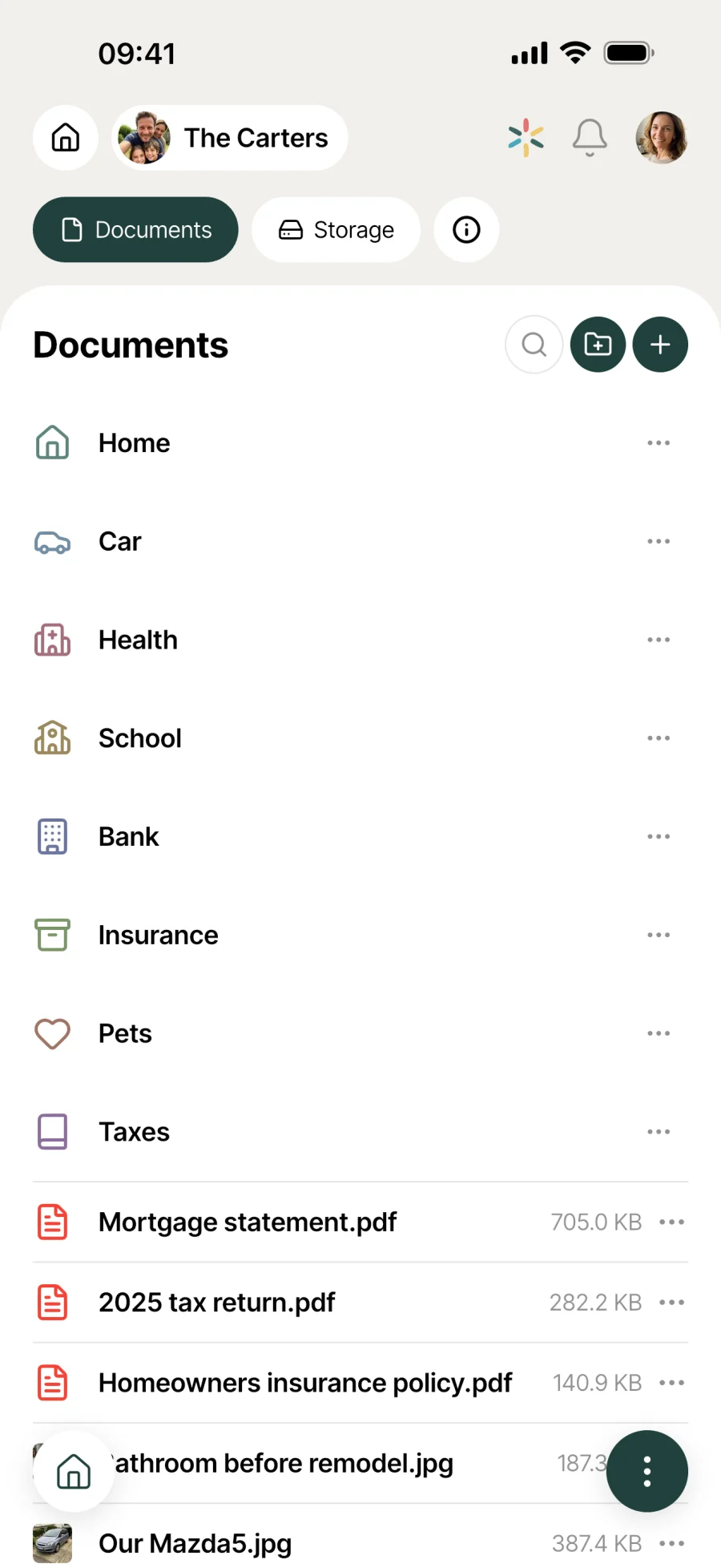
All the household’s paperwork in one app.
Bills, contracts, certificates, statements. Photo scans that become PDFs, colour-coded folders, built-in viewer, sharing in 2 taps. Available to every household member, everywhere.
Everyday life
No more hunting for that piece of paper
Papers pile up in drawers and on the desk. Finding them in 2 seconds makes all the difference when the school asks for a certificate or the solicitor is preparing your appointment.
The heating engineer’s bill arrives. You take a photo, Melimelo turns it into a readable PDF and files it in the Home folder. The paper original can go in the bin, the digital copy is sorted.
The school needs the insurance certificate for a class trip. Your partner finds it in Melimelo in 2 taps from the office and emails it to the teacher. No more “can you send it to me?” in the middle of a meeting.
Before the appointment with the solicitor, you go through everything: lease, certificates, contracts. All the paperwork is in one place, sorted into colour-coded folders, ready to open or share.
Features
Designed to end the 20-minute paper hunt.
Shared with the whole household
All the household’s documents in one place, open to every member. When someone’s away and gets asked for a document, it’s already in their pocket.
Scan with a photo
Take a photo of your document and Melimelo turns it into a readable PDF. No need for a separate scanner app, no fiddly file management.
Colour-coded folders
Sort things your way: school, car, home, admin, contracts. Give each folder a colour to tell them apart at a glance. Your filing follows your own system.
Built-in viewer
Open a PDF right in the app, without switching to another one. The viewer shows the document full page, and you move through it like in any reader.
Share by email or message
2 taps from the document: send it by email to someone, or by message through another app. The proof goes straight out, no need to download it first.
Available everywhere
Documents are synced and available on every screen in the household. If you change phones, they’re still there. If you lose one, you don’t lose them.
Connected to the rest
Alongside everything else in the household.
- ProvidersProviders
The contract with the plumber or the mechanic’s quote has its place in Documents, next to that provider’s card in Providers.
- VehiclesVehicles
Registration document, insurance certificate, service invoices: the paperwork for a household vehicle lives in Documents, the service history in Vehicles.
- BudgetBudget
Bills and rent receipts stored in Documents feed the costs tracked in Budget. The module keeps the proof, Budget keeps the overall view of spending.
- PetsPets
Vaccination record, identification certificate, pet insurance policy: the paperwork for the household’s animal companions has its place in Documents, next to their profile in Pets.


All the modules talk to each other. Not just these 4.
Free & Premium
What each plan includes for documents.
Try it out
€0no commitment
Included from the start, shared by the whole household.
This module isn’t included in the free plan.
All its features are reserved for the Premium plan. See the Premium column.
Everything unlocked for this module
No limits
€39.90/ year
that’s €3.32 a month
- Document library shared by the whole household
- Photo scans turned into readable PDFs
- Colour-coded folders (school, car, home...)
- Built-in PDF viewer in the app
- Share by email or message in 2 taps
- Access from every screen in the household
- Search by document name
A single Premium subscription covers the whole household, however many members it has. You take it out in the app on iPhone or Android, and it then works on every screen in the household.
06Questions about Documents
Everything people ask us about documents.
Straight answers to the questions people ask most before getting started.
07Get started
Your whole household,
on all your screens.
On iPhone, iPad, Android, Mac, Windows and in the browser. Every member connected, in real time. Your first module up and running in under a minute.
4.8out of 5
On the App Store
Active users
65k+
Already on board
No commitment, right in your browser.
3 steps, and the paperwork is filed.
Take a photo
The plus button adds a document. Take a photo of the paper original and Melimelo turns it into a readable PDF. No need for an external scanner app.
File it in the right folder
Choose the folder (school, car, home, or create your own) and give the document a clear name. Your documents stay organised over time, with no big sort-out later.
Find and share
Search by name to find it fast, open the PDF right in the app, or share it by email or message in 2 taps when someone asks you for proof.