

Budget
MelimeloBudget
Premium plan only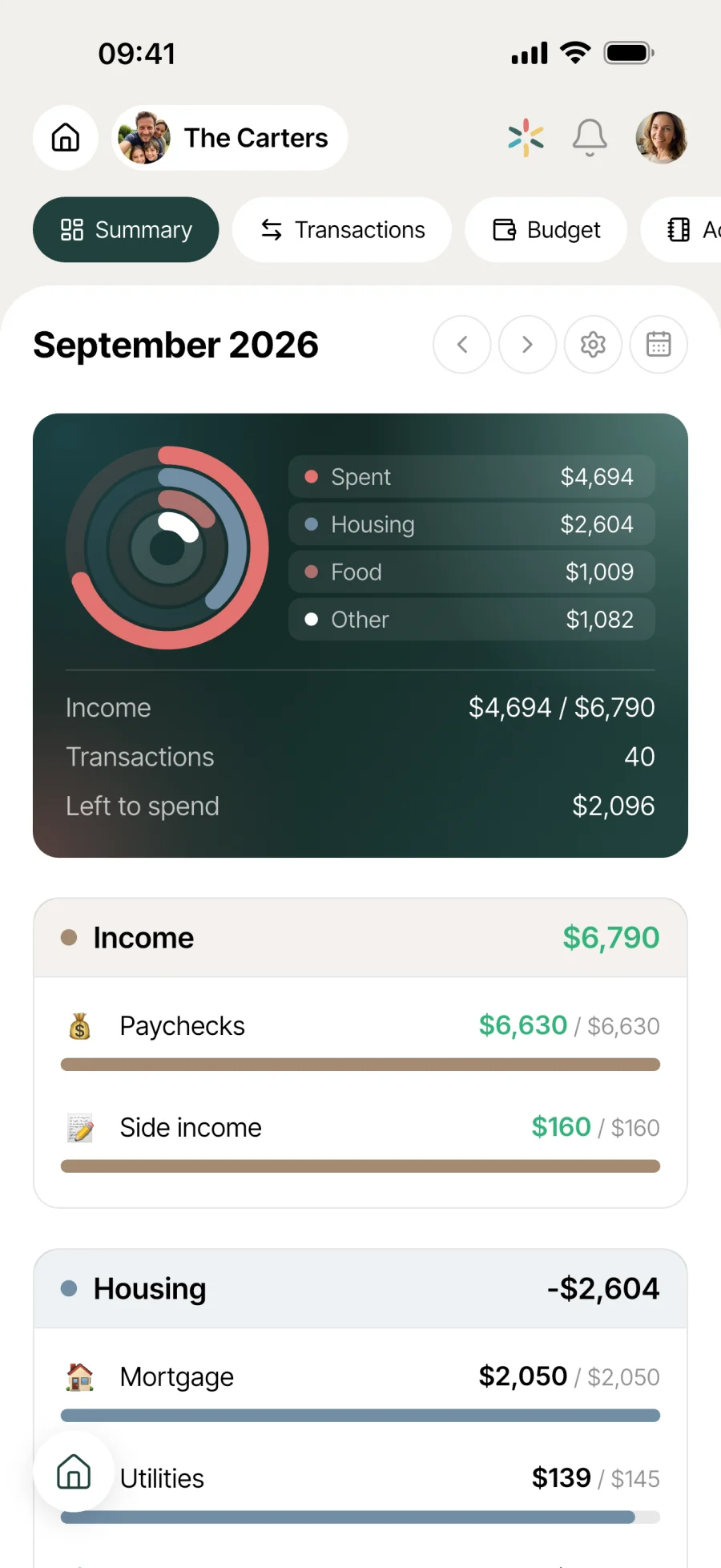
The household budget, clear and shared.
Income, expenses, savings, left to spend, transactions. All the household’s finances on one dashboard, updated in real time by the members of the household.

Everyday life
No more “where does the money go?”
A household means several incomes, dozens of expenses and one-off projects on top. A shared, up-to-date view changes the conversation about money at home.
The “Summary” at the top: what the household has spent against its income, section by section, and “Left to spend”, the money in minus the money out. In a second, you know what the household can still spend this month.
End of the month, Emma imports the joint account statement. The transactions land in one go, minus the duplicates, and the “Unassigned” filter shows what’s left to sort, with a category suggested from similar transactions.
In the yearly view, the “Spent” ring stays green below 75% of planned income, turns yellow above that and red from 100%. A visible signal before you look at the figures in detail.
Features
Designed to keep a level head.
Household dashboard
A “Summary” that shows at a glance what the household has spent against its income, each category against its planned amount, and “Left to spend”. Built-in monthly or yearly switch, with your choice kept from one visit to the next.
Spending ring
In the yearly view, a ring shows the share of planned income already spent. Green below 75%, yellow above, red from 100%. The signal comes before the detailed figures.
Sections and categories
3 section types: “Expenses”, “Income”, “Savings”, each with its own colour. Every category has its emoji (Salaries, Benefits, Rent, Groceries, Savings account, etc.). Start from a template or create your own, and reorder on the fly.
Monthly or yearly
Switch between the monthly and yearly view with a tap. Handy for choosing between a monthly or yearly subscription, or for spotting the costs that weigh on your year.
Planned savings
A “Savings” section groups your categories (savings account, ISA, crypto, etc.) and their contributions, monthly or yearly. In the “Budget” tab, what’s “Left” works itself out: income minus expenses and savings.
Accounts and transactions
Add the household’s accounts (bank, account members), then your transactions: amount, description, payee, account, payment method. Each month shows its “Money in” and “Money out”, with search and an “Unassigned” filter.
OFX statement import
Rather than retyping a month of transactions by hand, import the OFX file your bank provides. The transactions land in the budget, ready to be sorted.
Connected to the rest
Alongside everything else in the household.
- TravelTravel
A trip has its own “Budget” tab: the trip’s expenses, who paid for them and their “Breakdown” between participants. They stay in the trip, separate from the household’s transactions.
- ShoppingShopping
Groceries are one of the most unpredictable costs in a household. Keeping the shopping list in its own module and the amount in Budget helps you see where the overspending hides.
- Meal planMeal plan
Planning the week’s meals in Meal plan helps you anticipate the grocery budget that follows. The 2 modules work together to keep everyday spending in check.
- SplitSplit
2 different questions. Budget answers “where does the household’s money go, month after month”, around accounts, transactions and sections. Split answers “who paid for what” within a group of people, with a balance to settle and an end point. They share no data.




All the modules talk to each other. Not just these 4.
Free & Premium
What each plan includes for the budget.
Try it out
€0no commitment
Included from the start, shared by the whole household.
This module isn’t included in the free plan.
All its features are reserved for the Premium plan. See the Premium column.
Everything unlocked for this module
No limits
€39.90/ year
that’s €3.32 a month
- Summary dashboard shared by the household
- Colour-coded sections by type (income, expenses, savings), categories with an emoji
- Monthly or yearly view, switch any time
- Left to spend worked out automatically
- Share of income spent, in green, yellow or red
- Planned savings with monthly or yearly contributions
- Household accounts and transactions, with search and filters
- OFX bank statement import
- Expenses shown as a donut chart
- Real-time use by every household member
A single Premium subscription covers the whole household, however many members it has. You take it out in the app on iPhone or Android, and it then works on every screen in the household.
06Questions about the budget
Everything people ask us about the budget.
Straight answers to the questions people ask most before getting started.
07Get started
Your whole household,
on all your screens.
On iPhone, iPad, Android, Mac, Windows and in the browser. Every member connected, in real time. Your first module up and running in under a minute.
4.8out of 5
On the App Store
Active users
65k+
Already on board
No commitment, right in your browser.
3 steps, and the household breathes easier.
Set out your income and expenses
Create your income and expense sections, then their categories with an emoji (Salaries, Rent, Groceries, Subscriptions, etc.). Add the amounts and say whether they’re monthly or yearly.
Set up your savings
Add a “Savings” section (savings account, ISA, other) with its monthly or yearly contributions. The “Left” figure in the “Budget” tab updates automatically.
Track and share
Enter or import your transactions, then open the “Summary” to see how the household is doing, up to date for everyone with access. For costs paid upfront between friends, Split works out who owes whom.