
 The Carters





Recipes
MelimeloRecipes
Free up to a cap, unlimited with Premium
The shared recipe book for the whole household.
All the household’s recipes in one shared recipe app: written by hand, imported from a website or Instagram, or created by Melia from a photo. 6 recipes on the free plan, unlimited with Premium.
- Shared with the whole household, 6 recipes on the free plan
- Import from a website, Instagram or TikTok with Premium
- The community’s online recipes, ready to copy into your recipe book


 Asian
 Main course
 Meat
Everyday life
No more “what was that recipe again?”
Good recipes get passed around: between parents, between generations, between friends and between browser tabs. Gathering them in one recipe book the whole family opens in the kitchen is what changes things.
- 01
A curry recipe spotted on Instagram. With Premium, you share the video to Melimelo: Melia reads its description, listens to the video if needed, and the recipe lands in the recipe book with its ingredients and steps.
- 02
Grandma’s apple tart, entered once with its ingredients, steps and photo. The day Olivia wants to make it again, she opens it on her phone, without calling to ask for the quantities again.
- 03
The curry serves 3, and there’ll be 6 of you on Saturday. With Premium, you change the number of servings and Melia recalculates the quantities, right down to the steps that mention a weight.
In detail
What the recipe book app really does
Here are the screens as they appear in Melimelo, with the Carters’ recipe book.
01Shared recipe book
A shared recipe book, on every household member’s phone
Emma, James, Olivia and Noah see the same recipes, each with its photo, total time and number of servings. When James adds a ramen recipe, the others get a notification and the recipe goes to the top of the recipe book.
The magnifying glass searches for a recipe by name, the funnel filters the recipe book by tag: Asian, Dessert, Quick. The free plan keeps up to 6 recipes, with no limit on Premium.

New recipe addednow
James added the recipe “Tantanmen ramen”
Household recipes

Tantanmen ramen

Thai red chicken curry
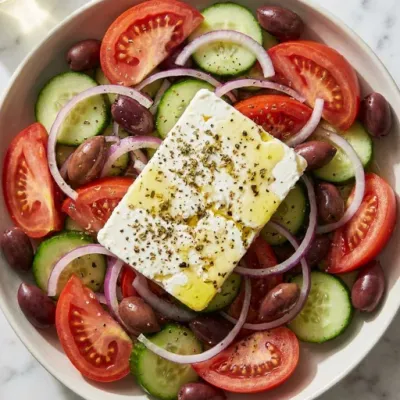
Traditional Greek salad

Tagliatelle carbonara
02Recipe page
Create a recipe page with its ingredients and steps
On the free plan, create a recipe by hand: name, photo, tags, servings, prep and cooking times. Then add each ingredient with its quantity, “2 tbsp”, “500 g” or “1 pinch”, followed by the steps one by one.
The recipe page shows the times and servings at the top, then the ingredients, then the numbered steps in order. Press and hold an ingredient or a step to move it, swipe it left to delete it.
Thai red chicken curry
40 min 15 min 3
Steps
- 1Mix the chicken thighs with the soy sauces, the oyster sauce, a teaspoon of brown sugar and the pepper.
- 2Leave the meat to take on the flavours for at least 30 minutes.
- 3Sear the chicken in a frying pan until it is nicely browned, glazed and cooked through, then set it aside.
- 4Fry the red curry paste with the chopped garlic and ginger in the same pan for 2 minutes.
03Import from the web Premium
Import a recipe from a website, Instagram or TikTok
Paste a recipe link into “Import from the web”: Melia pulls out the name, the ingredients and their quantities, the steps, the number of servings and the times. You check the summary, adjust the name, servings and times, then create the recipe.
An Instagram, TikTok, Facebook or YouTube Shorts video works too, shared to Melimelo from the network’s app: Melia reads its description and, if that’s not enough, listens to the video. Importing is part of the Premium plan.
Import your recipes in 1 click
Paste a recipe URL from your favorite site or social network, and let Melia handle the rest ✨
The recipe image won’t be imported, out of respect for copyright. You can add one yourself.
04Create with Melia Premium
Create a recipe from a photo, or just from what you fancy
Take a photo of your dish or of a page from a book, a recipe card or a magazine, up to 3 photos for a recipe spread over 2 pages. Melia recognises the dish or reads the text, then writes up the ingredients, quantities and steps, which you check before saving.
“Create with Melia” opens a conversation: say what you fancy or the ingredient you want to use, and Melia suggests a complete recipe in her very first reply. You fine-tune it by talking to her, then confirm her card to add it to the recipe book.
Create a recipe from a photo
Snap your dish or the recipe you want to keep, and let Melia turn it into a recipe ✨
Your photos show:

The dish

The written recipe
Your photos
Add up to 3 photos, for example the 2 pages of a recipe.
05Servings Premium
Adapt a recipe to the number of servings, quantities included
“Change servings” takes the curry from 3 to 6 servings, up to 50. With Premium, Melia recalculates each quantity with kitchen-friendly rounding, half an onion rather than 0.5 onion, leaves small amounts like a pinch of salt as they are, and rewrites the steps that mention a weight.
On the free plan, you can change the number of servings, but the quantities aren’t recalculated.
Change servings
How many servings do you want to adapt this recipe for?
6
Recalculate quantities
Melia will recalculate the quantities
06Shopping list Premium
Add a recipe’s ingredients to the shopping list, without duplicates
“Add to shopping list” sends the ingredients to your shared shopping list, the main one or a themed list, for the chosen number of servings. Melia adds the quantities to what’s already there, grams and kilos, millilitres and litres included.
A pinch of salt or a spoonful of oil goes on under its name alone, and chicken doesn’t get mixed up with chicken legs. For the week ahead, “Add to meal plan” puts the recipe on a day and meal of the weekly meal plan.
Add to shopping list
Melia will go through your current shopping list and add the ingredients you need, without duplicates.
Serves 1Serves 2Serves 3Serves 4Serves 5Serves 6Serves 7
Shopping list
Main list
Noah’s birthday
07Nutrition Premium
A recipe’s calories and macros, per serving
On the recipe page, “Estimate” asks Melia for the nutritional values of one serving, based on the ingredients and how it’s cooked: energy, protein, carbs and fat, then sugars, fibre, saturated fat and salt in the details. The calories then appear next to the times.
Melia adds her take in a few lines, like an idea to make the dish lighter. The values are estimates only: Melia can make mistakes.
Nutrition per serving
625 kcal
Energy
35.8 g
Protein
34.1 g
Carbs
38.4 g
Fat
Calorie split 23% 22% 55%
Melia’s take
This homemade Thai curry is a real treat thanks to the nicely glazed chicken and the scent of fresh basil. To balance the richness of the coconut milk, don’t hold back on the pepper, or add a few bamboo shoots for even more crunch.
Estimates only, Melia can make mistakes.
And also
The details that keep the recipe book alive.
Online recipes
The “Online recipes” tab offers recipes from Melimelo and its community, sorted by tag. A recipe you like can be copied into your recipe book, where you can make it your own.
Tags and categories
Each recipe has its tags, Asian, Dessert or Quick, which filter the recipe book. With Premium, you also create your own categories, each with its name and emoji, as tabs at the top of the recipe book.
A photo created by Melia
No photo for your recipe? Melia creates one from its name and ingredients, up to 10 times a month.
Share by link or as a PDF
A public link opens the recipe for anyone, even without Melimelo. With Premium, it can also go out as a PDF with its ingredients and steps, ready to print.

Also worth exploring
The modules that go with it.
- ShoppingShopping
With Premium, a recipe’s ingredients go onto the main list or a themed list, added to what’s already there.
- Meal planMeal plan
With Premium, “Add to meal plan” puts a recipe on a day and meal of the week, and a meal on the meal plan can use a recipe from the recipe book.
- FridgeFridge
A meal box in the fridge can take the name and photo of a recipe from the recipe book.
- EntourageEntourage
A recipe is shared with the households in your entourage; one a loved one shares with you joins your recipes, photo included.



All 31 modules share the same household and the same members.
Free & Premium
What each plan includes for recipes.
Try it out
€0no commitment
Included from the start, shared by the whole household.
- Recipe book shared by the whole household
- Number of recipes in the recipe book 6 max
- Create by hand: photo, ingredients, steps, times
- Tags and search in the recipe book
- Online recipes from the community
- Share a recipe with a public link
- Change the number of servings
- Quantities recalculated by Melia for the number of servings
- Custom categories with their own emoji
- Import from a website, Instagram, TikTok, Facebook or YouTube Shorts
- Create from a photo or by chatting with Melia
- Ingredients added to the shopping list, without duplicates
- Recipe added to the weekly meal plan
- Calories and macros per serving
- Recipe photo created by Melia
- PDF export of the recipe
Everything unlocked for this module
No limits
€39.90/ year
that’s €3.32 a month
- Recipe book shared by the whole household
- Number of recipes in the recipe book Unlimited
- Create by hand: photo, ingredients, steps, times
- Tags and search in the recipe book
- Online recipes from the community
- Share a recipe with a public link
- Change the number of servings
- Quantities recalculated by Melia for the number of servings
- Custom categories with their own emoji
- Import from a website, Instagram, TikTok, Facebook or YouTube Shorts
- Create from a photo or by chatting with Melia
- Ingredients added to the shopping list, without duplicates
- Recipe added to the weekly meal plan
- Calories and macros per serving
- Recipe photo created by Melia 10 a month
- PDF export of the recipe
A single Premium subscription covers the whole household, however many members it has. You take it out in the app on iPhone or Android, and it then works on every screen in the household.
06Questions about recipes
Everything people ask us about recipes.
Straight answers to the questions people ask most before getting started.
07Get started
Your whole household,
on all your screens.
On iPhone, iPad, Android, Mac and in the browser. Every member connected, in real time. Your first module up and running in under a minute.
4.7out of 5
On the App Store
Active users
75k+
Already on board
No commitment, right in your browser.