

Calendar
MelimeloCalendar
Free and unlimited, with Premium options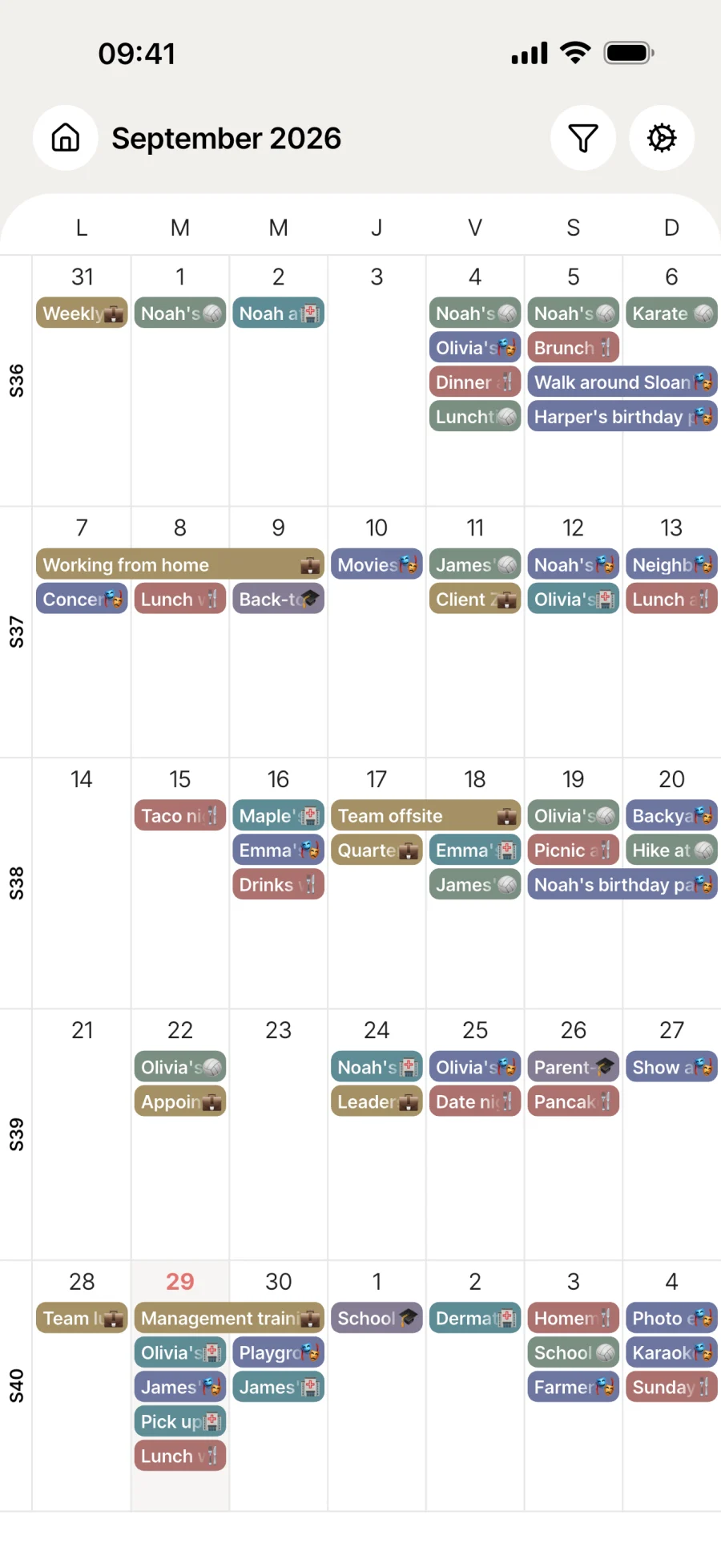
One shared calendar for the whole household.
Every household appointment in one view, shared across all the household’s screens. List, day, week, month. Google, Outlook and iCloud sync included in the free plan.
Everyday life
No more “who’s taking who where?”
Between the kids’ activities, medical appointments, birthdays and work commitments, a household generates a lot of events. One shared view is all it takes to keep pace.
Wednesday 4pm, Olivia’s dance show. Mum adds it from the office, and Dad and Grandma see it on their phones a second later, with no phone call or screenshot needed.
Monday judo is created just once. Melimelo repeats it every week, and the reminder comes 30 minutes before so the bag gets packed in time.
Filter the calendar to a single household member to see everything they have on this week at once. Month view to plan ahead, day view in the morning before you head out.
Features
One view that leaves no one out.
The whole household, in real time
Every addition and every change shows up instantly on the other members’ screens. Kids, partners, grandparents: everyone sees the same thing, to the second.
Recurring events
Dance class, custody weeks, Monday physio: create it once, Melimelo repeats it. Weekly, monthly, “every other Wednesday”, ending automatically after X times or on a set date.
4 views, one calendar
List for everyday, day for the morning, week to plan, month to look ahead. Your preference is remembered from one launch to the next.
Custom reminders
A notification for you or for a specific household member, from 5 minutes to 30 days before the event. No more forgotten appointments.
Filter by member
Show only one person’s events. Ideal for checking what your teenager has on this week without cluttering the screen with everything else.
Google, Outlook and iCloud sync
Connect your existing calendars in a few taps. Events come into Melimelo and your colour choices are kept.
Public and school holidays
Turn on public holidays for France, Belgium or Switzerland, and the school holidays for your area. They’re highlighted without cluttering your list of events. No more hunting for the autumn holiday dates every year.
Emoji event types
Each event type has its own emoji: sport, school, doctor, work. The calendar reads at a glance, and you can switch the emojis off if you prefer a plainer look.
Birthdays in the calendar
Your contacts’ birthdays show up among your events, in all 4 views. You see them coming as you plan your week, without opening another screen.
Home screen widget
The Melimelo widget shows your day, week or month right on your phone’s home screen, on iOS and Android alike. One glance is enough, no need to open the app.
PDF export
Generate a clear PDF of the month to print for the fridge, share with the wider family or keep for your records. Include the events or just the grid, your choice.

Connected to the rest
Linked to everything else in the household.
- BirthdaysBirthdays
Birthdays live in their own shared book, next to the events calendar. 2 complementary views of household life.
- RoutinesRoutines
The household’s weekly or monthly routines find their place in the calendar, alongside everything else.
- Meal planMeal plan
The weekly meal plan can create an event for each meal, so nobody has to ask “what’s for dinner tonight?”.
- TasksTasks
Tasks with a due date show up in the calendar, so nothing that needs doing slips through.




All the modules talk to each other. Not just these 4.
Free & Premium
What each plan includes for the calendar.
Try it out
€0no commitment
Included from the start, shared by the whole household.
- Unlimited events, no cap
- Calendar shared in real time
- List, day, week and month views
- Multi-user by design
- Custom event types (colours, icons)
- Filter by household member
- Public holidays (France, Belgium, Switzerland)
- Google, Outlook and iCloud sync
- Recurring events
- Reminders from 5 minutes to 30 days before the event
- Calendar PDF export
- Birthdays shown among events
Everything unlocked for this module
No limits
€39.90/ year
that’s €3.32 a month
- Unlimited events, no cap
- Calendar shared in real time
- List, day, week and month views
- Multi-user by design
- Custom event types (colours, icons)
- Filter by household member
- Public holidays (France, Belgium, Switzerland)
- Google, Outlook and iCloud sync
- Recurring events
- Reminders from 5 minutes to 30 days before the event
- Calendar PDF export
- Birthdays shown among events
A single Premium subscription covers the whole household, however many members it has. You take it out in the app on iPhone or Android, and it then works on every screen in the household.
06Questions about the calendar
Everything people ask us about the calendar.
Straight answers to the questions people ask most before getting started.
07Get started
Your whole household,
on all your screens.
On iPhone, iPad, Android, Mac, Windows and in the browser. Every member connected, in real time. Your first module up and running in under a minute.
4.8out of 5
On the App Store
Active users
65k+
Already on board
No commitment, right in your browser.
3 steps, and everything falls into place.
Create or sync
Add an event by hand or connect your Google, Outlook or iCloud calendar. Your existing events come in within a few minutes.
Choose who sees it, who gets notified
Assign participants from the household members. Turn on a reminder for yourself or someone else, as far ahead as you like.
Keep the rhythm
Recurring events for appointments that come round again, public holidays highlighted, list/day/week/month views depending on the time of day.