

Providers
MelimeloProviders
Included in the free plan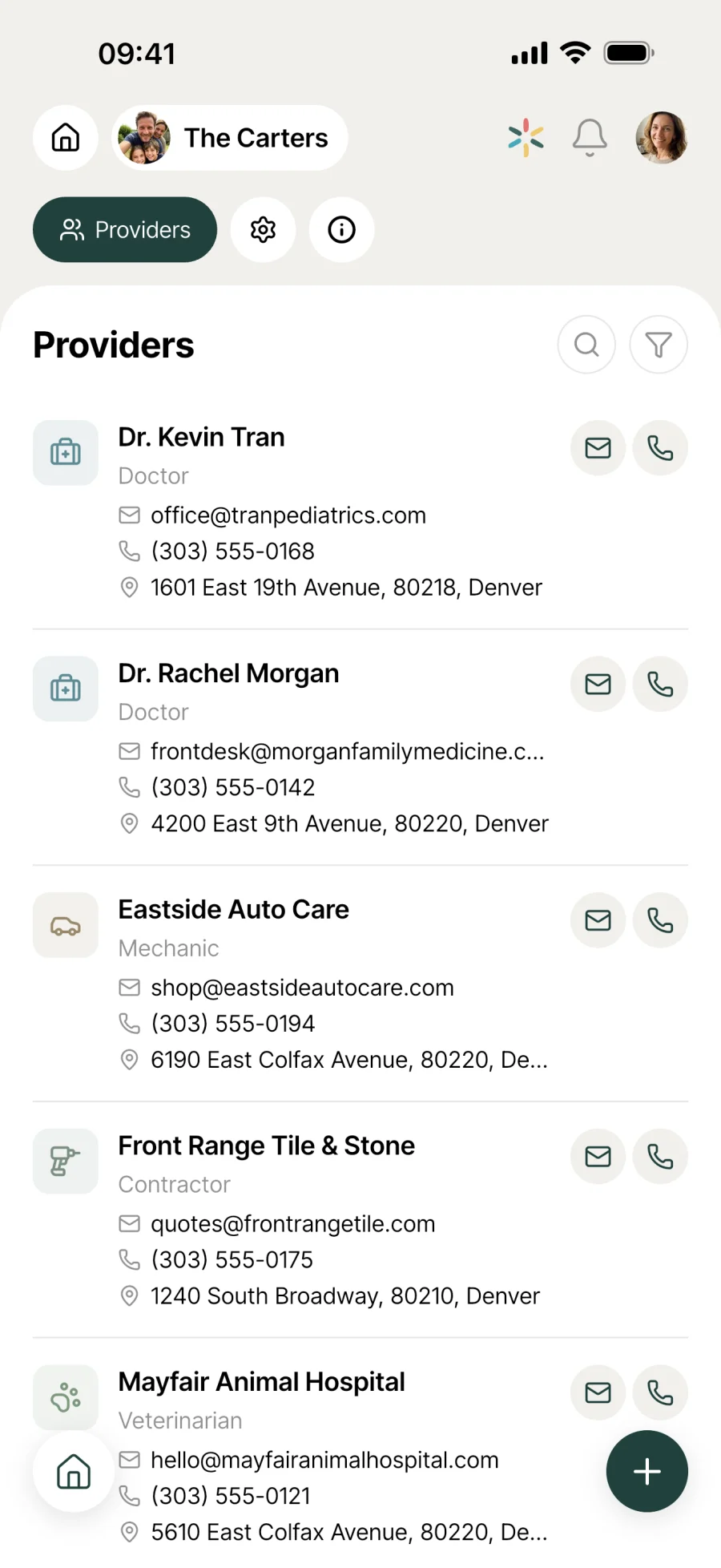
The service provider directory shared by the whole household.
Plumber, doctor, mechanic, vet, babysitter. All the household’s pros in one shared directory, with custom types, filters, and direct call and map buttons on each card.
Everyday life
No more “can you send me their number again?”
The trusted plumber, the family doctor, the regular babysitter. When several people run the household, finding the right contact at the right time shouldn’t be a headache.
The plumber is coming on Tuesday and you won’t be in. Your partner opens Melimelo, finds the plumber’s card in 2 taps and calls straight from the app to agree a time. No more “can you send me their number again?”
The tap is leaking on Sunday evening. You need a plumber, so you filter by the “Plumber” type in Melimelo and your usual one appears with their number. No more panicking while scrolling through last year’s texts.
You’ve just moved and you’re rebuilding your list of pros. Rather than retyping everything, you import the useful contacts from your phone. Photo, number and email come across automatically.
Features
Designed to let you find and call in 2 taps.
Shared with the whole household
All the household’s providers in one place, available to every member. When someone has to deal with a problem or an appointment, they have the right contact straight away, without having to ask.
Import from your phone
Rather than retyping every card, import work contacts straight from your phone’s contacts. Name, number, email and photo come across automatically.
Custom types
Plumber, doctor, mechanic, babysitter, vet... Create your own provider types with an icon and a colour. The directory reflects how your household is organised, not a fixed list.
Filter by type
A funnel icon next to the search bar filters instantly by provider type. Handy when you’re looking for “the doctor” and can’t remember their exact name.
Direct call and email
From a provider’s card, the call and email buttons are a tap away. No more copying a number or address to paste it somewhere else.
Directions in one tap
The location button opens directions to the provider straight in your phone’s maps app. Useful for that dentist appointment on the other side of town.
Connected to the rest
Alongside everything else in the household.
- PetsPets
Vet, groomer, boarding kennels, dog-sitter: the contact details of the pros who look after the household’s pets live here, next to the health records in Pets.
- OutdoorsOutdoors
Pool technician, gardener, landscaper, tree surgeon: the pros who work on the garden and pool are kept here, next to the sheets in Outdoors.
- VehiclesVehicles
Mechanic, inspection centre, body shop: the contacts for the household’s vehicles live in Providers, next to the maintenance tracked in the Vehicles module.
- CalendarCalendar
A doctor’s appointment or the plumber’s visit are events for the household calendar. Providers keeps the contact card, the calendar keeps the time.




All the modules talk to each other. Not just these 4.
Free & Premium
What each plan includes for service providers.
Try it out
€0no commitment
Included from the start, shared by the whole household.
- Provider directory shared by the whole household
- Create a contact card manually
- Import a contact from your phone’s contacts
- Custom types (icon and colour per category)
- Filter by type
- Search by name
- Direct call button on the contact card
- Direct email button on the contact card
- Location button to open directions
- Multi-user by design
Same as the free plan
Everything included free
€39.90/ year
that’s €3.32 a month
Nothing to unlock for this module.
All its features are already included in the free plan. See the free plan column for details.
A single Premium subscription covers the whole household, however many members it has. You take it out in the app on iPhone or Android, and it then works on every screen in the household.
06Questions about Providers
Everything people ask us about service providers.
Straight answers to the questions people ask most before getting started.
07Get started
Your whole household,
on all your screens.
On iPhone, iPad, Android, Mac, Windows and in the browser. Every member connected, in real time. Your first module up and running in under a minute.
4.8out of 5
On the App Store
Active users
65k+
Already on board
No commitment, right in your browser.
3 steps, and the directory is ready to use.
Build your collection
Create cards manually, or import contacts straight from your phone’s contacts. Choose or create the matching type (with a custom icon and colour).
Filter or search
Use the search bar to search by name, or the funnel to filter by type. The card you need is 2 taps away, even when the household has dozens.
Act from the card
Call, email, directions: every action is a tap away from the card. No need to switch apps to copy and paste a number or an address.