

Vehicles
MelimeloVehicles
Included in the free plan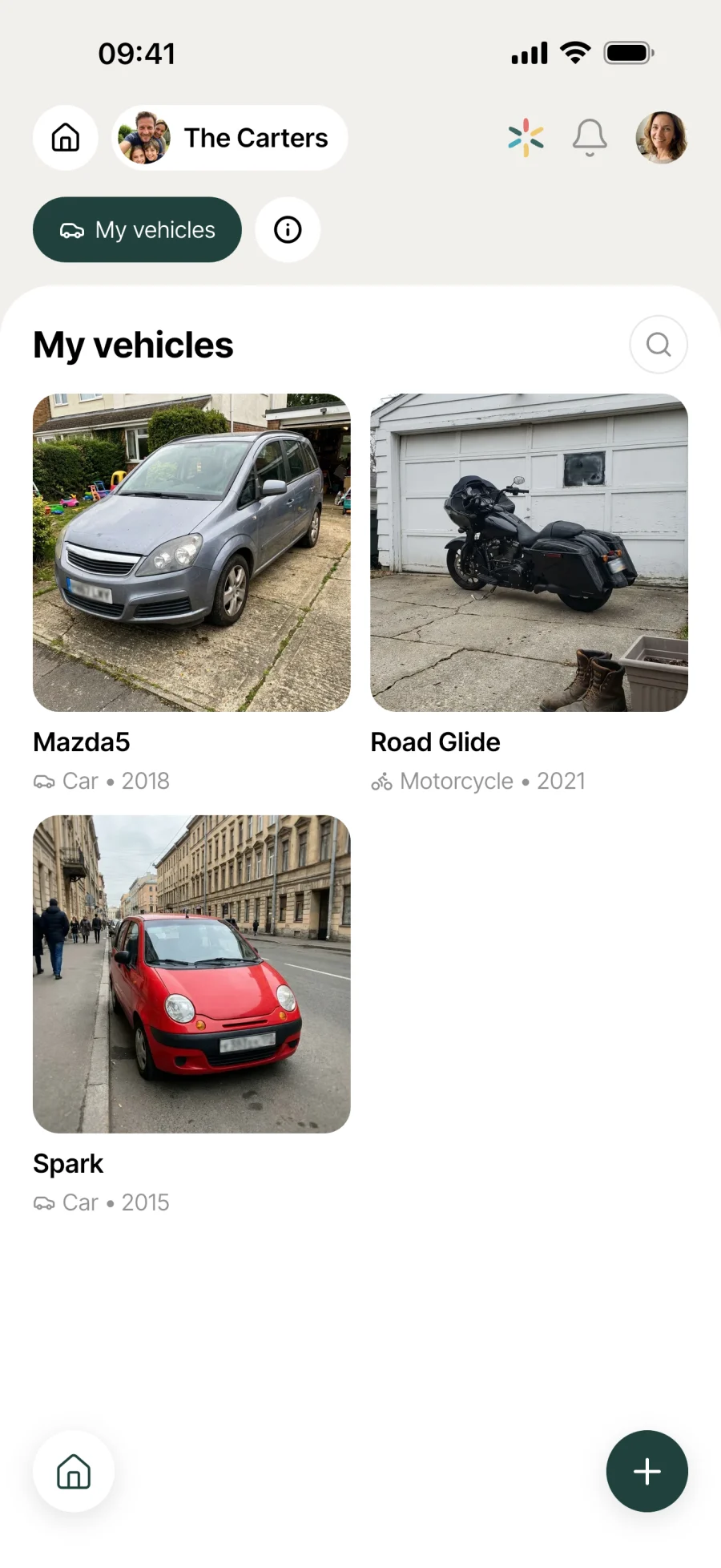
The maintenance log for every vehicle in your household.
The household’s cars and motorbikes in one shared log. Inspection date tracked with a colour code, service history (oil changes, tyres, brakes), broad search.

Everyday life
No more “when was the last oil change?”
A vehicle comes with a file that grows over the years. Without a dedicated place, it all ends up as receipts in a drawer and hazy memories. A shared log changes everything.
The inspection date turns orange at 90 days, bright orange at 30 days and red once it’s passed. One glance at the list and you know whether to book the garage this week or not.
Oil change done at the garage: you log the name, cost, date and provider. 6 months later, your partner checks the history and knows when the last one was done, without digging through the receipts in the drawer.
You type “Captur” in the search bar: the card appears with its registration, year and full service history. Handy when the household has 2 cars and a scooter.
Features
Designed to keep track of your vehicles for the long run.
Shared with the whole household
All the household’s cars and motorbikes in one log, available to every member. When one of you takes the car to the garage, the other sees the service in the history without having to ask.
Vehicle details
Name, type (car or motorbike), make, registration, year, fuel type. Add a photo to recognise the card at a glance in the list.
Inspection date tracked
Enter the inspection expiry date. The card shows a colour code: green (more than 90 days), orange (under 90 days), bright orange (under 30 days), red once the date has passed.
Service history
A dedicated tab in the vehicle’s card. Oil change, service, tyres, brakes, or any name for specific jobs. Each entry keeps its date, cost and provider.
Cost and provider for each service
Note the amount paid and the garage that did the work. Over time, the history shows you where you get this vehicle serviced and how much you spend keeping it in good shape.
Broad search
The search bar filters by name, make and registration. Handy for finding the right card fast when the household has several vehicles.
Photo and description
For each service, you can add a free-text description (for example “front brake pads replaced + wheel balancing”) to go with the short name. For jobs that deserve some detail, it’s all there.
Everything is dated
Every service is dated and kept. The card holds the vehicle’s history from its very first visit. Useful when you sell, handy for seeing how often it really goes to the garage.
Connected to the rest
Alongside everything else in the household.
- ProvidersProviders
Mechanic, inspection centre, body shop: the contact details of the pros who work on your vehicles live in Providers, next to the service history tracked here.
- BudgetBudget
Fuel, insurance, servicing, parking: vehicles weigh on the household budget. The service costs logged here feed the overall picture in Budget.
- CalendarCalendar
A garage appointment or an inspection are events for the calendar. The card keeps the history, the calendar keeps the time.
- TravelTravel
Before a long drive, a quick look at the service log: is the car’s service up to date? The Travel module plans the trip, Vehicles tells you whether the car is ready for it.




All the modules talk to each other. Not just these 4.
Free & Premium
What each plan includes for vehicles.
Try it out
€0no commitment
Included from the start, shared by the whole household.
- Vehicle log shared by the whole household
- Cars and motorbikes with photo, make, registration and fuel type
- Inspection (MOT) expiry date with colour coding
- Service history tab (oil changes, servicing, tyres, brakes...)
- Custom maintenance types
- Cost, provider and description for each service
- Search by name, make or registration
- Multi-user by design
Same as the free plan
Everything included free
€39.90/ year
that’s €3.32 a month
Nothing to unlock for this module.
All its features are already included in the free plan. See the free plan column for details.
A single Premium subscription covers the whole household, however many members it has. You take it out in the app on iPhone or Android, and it then works on every screen in the household.
06Questions about Vehicles
Everything people ask us about vehicles.
Straight answers to the questions people ask most before getting started.
07Get started
Your whole household,
on all your screens.
On iPhone, iPad, Android, Mac, Windows and in the browser. Every member connected, in real time. Your first module up and running in under a minute.
4.8out of 5
On the App Store
Active users
65k+
Already on board
No commitment, right in your browser.
3 steps, and the service log stays up to date.
Create the vehicle’s card
Enter the name and type (car or motorbike), and optionally the make, registration, year, fuel type and inspection expiry date. Add a photo if you like.
Log services as you go
After each trip to the garage, open the vehicle’s card, go to the Service history tab and add the job with its date, cost and provider.
Keep an eye on due dates
The inspection colour code catches your eye as the due date approaches. Searching by name, make or registration finds the right card in 2 taps.