

Outdoors
MelimeloOutdoors
Included in the free plan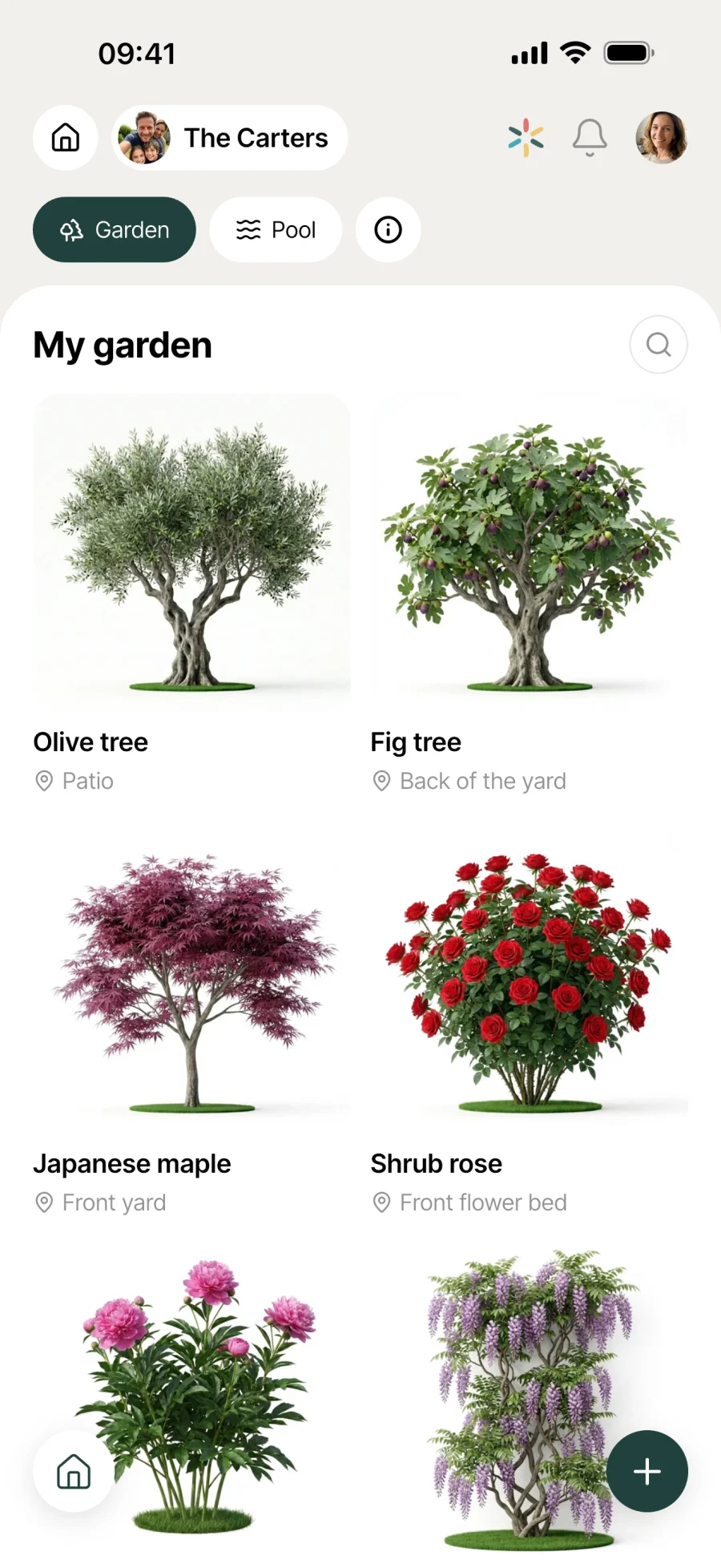
Your garden and pool in one app.
Your balcony, garden and houseplants on one side. Your pools, with readings and maintenance, on the other. All tracked in the household and shared between members.
Everyday life
No more “how often was it again?”
Gardens and pools need looking after over the long run. With one sheet shared by every household member and a dated history, what everyone knows stops getting lost in someone’s head.
You’re torn over a plant at the garden centre. You look it up in the catalogue by its scientific name, and its sheet opens with its watering and pruning needs and common diseases. Before you buy, you know whether it will survive at yours.
Saturday morning, you walk round the pool and take your reading: pH 7.4, chlorine stable, 24°. You log it in Melimelo. The whole household sees it, and the dated history stays to hand in case the pool technician asks.
You’re off on holiday for 3 weeks and your neighbour is looking after the balcony plants. You share the care sheets with them from Melimelo: they know when to water and when not to, without having to bother you.
Features
Designed to keep track for the long run.
Garden tab
Your plants in the garden, on the balcony or around the house. One sheet per plant with a photo, custom name and location. No cap: add as many as you like.
Pool tab
Pool tracking, switched on in the household settings. You can add several pools, each with its own treatment type.
Plant catalogue
Search Melimelo’s database by common or scientific name. Every plant in the catalogue comes with a reference sheet: when to prune, water and feed, common diseases, practical tips.
5 treatment types
Chlorine, salt, bromine, active oxygen or UV. You choose the type when you create the pool, and the readings adapt automatically to what you actually measure.
Readings and actions
Measurements (pH, treatment level, temperature), treatments, filter cleaning, winterising, opening and other custom actions. Everything is logged in a few taps.
Dated history
Every entry is dated and kept. Handy when the pool technician asks “what did you put in last month?”, or to spot the treatment frequency that works best.
Photo and location
For each plant, add a photo (taken on the spot or picked from your gallery) and note its location (patio, north garden, living room). So you recognise the sheet at a glance.
Shared with the household
Every household member sees the sheets and readings. Especially useful when several people look after the garden or pool, or to pass instructions on to your plant-sitter.
Connected to the rest
Linked to everything else in the household.
- RoutinesRoutines
Watering the balcony, trimming the hedge, cleaning the filter: anything that comes round regularly lives in Routines, next to the plant and pool sheets in Outdoors.
- ShoppingShopping
Fertiliser, compost, pool chemicals: regular purchases for the garden and pool go straight onto the household shopping list.
- ProvidersProviders
Pool technician, gardener, landscaper: the contact details of your outdoor pros are kept in Providers, next to the sheets in Outdoors.
- CalendarCalendar
Winterising, seasonal opening, major pruning: dated appointments for the garden and pool live in the household calendar.

All the modules talk to each other. Not just these 4.
Free & Premium
What each plan includes for outdoors.
Try it out
€0no commitment
Included from the start, shared by the whole household.
- Garden and Pool tabs
- Plant catalogue, searchable by name or scientific name
- Care sheet (pruning, watering, feeding, common diseases)
- Photo, custom name and location for each plant
- Track several pools, each with its own treatment type
- 5 treatment types: chlorine, salt, bromine, active oxygen, UV
- Readings (pH, treatment level, temperature)
- Maintenance actions (filter cleaning, winterising, opening)
- Dated history, kept over time
- Multi-user by design
Same as the free plan
Everything included free
€39.90/ year
that’s €3.32 a month
Nothing to unlock for this module.
All its features are already included in the free plan. See the free plan column for details.
A single Premium subscription covers the whole household, however many members it has. You take it out in the app on iPhone or Android, and it then works on every screen in the household.
06Questions about Outdoors
Everything people ask us about the garden and pool.
Straight answers to the questions people ask most before getting started.
07Get started
Your whole household,
on all your screens.
On iPhone, iPad, Android, Mac, Windows and in the browser. Every member connected, in real time. Your first module up and running in under a minute.
4.8out of 5
On the App Store
Active users
65k+
Already on board
No commitment, right in your browser.
3 steps, and tracking is up and running.
Switch between Garden and Pool
The Garden tab for plants (indoors, balcony, garden), the Pool tab for pools. If you have a pool, switch it on in the household settings.
Create your sheets
Plants: search the catalogue, add a photo and location. Pools: create the pool and choose its treatment type from the 5 available.
Keep track
Plants: open the care sheet whenever you’re unsure. Pools: log your readings and actions week by week. The history stays to hand, shared with the household.