

Routines
MelimeloRoutines
Premium plan only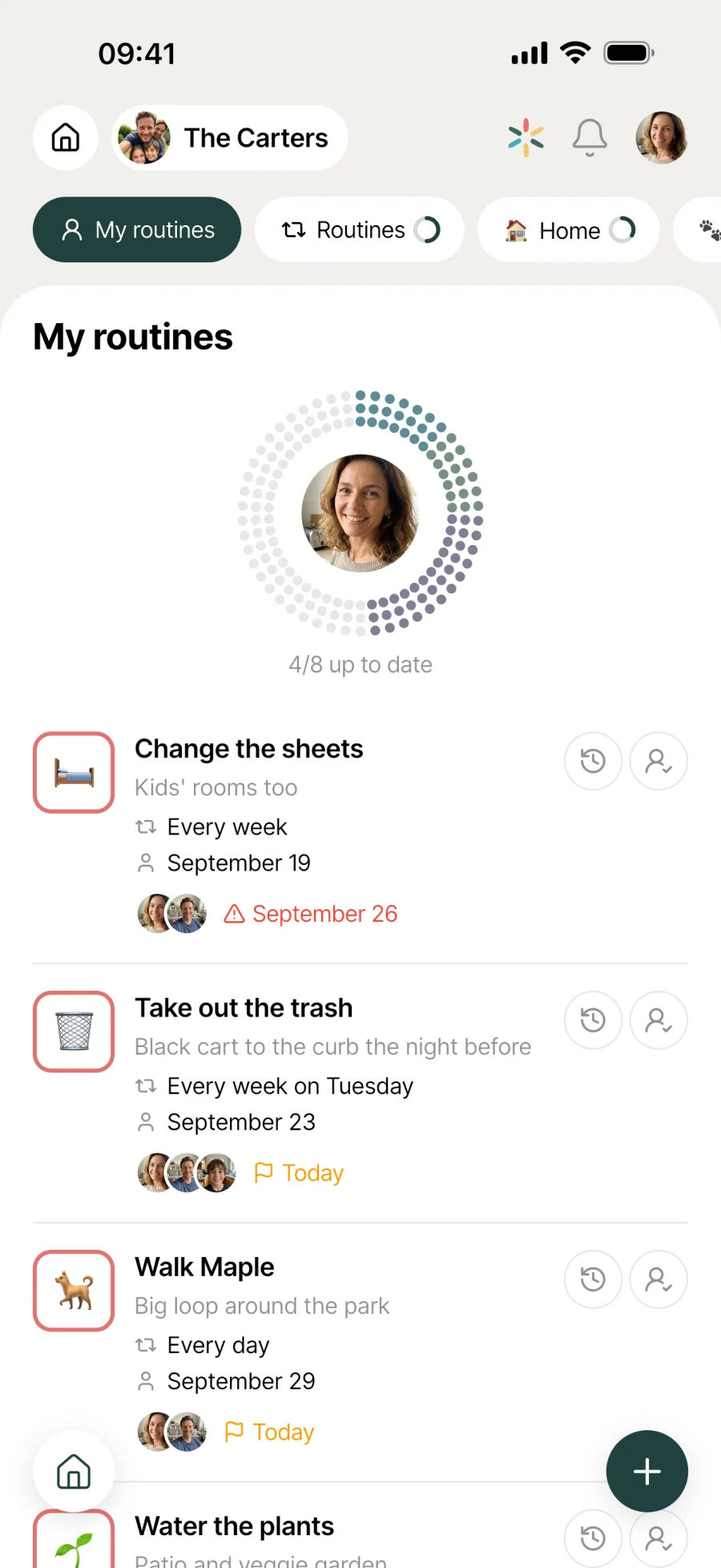
Well-oiled routines for a household that runs smoothly.
Cleaning, watering, filters, laundry: whatever comes round regularly lives in Routines. Flexible repeats, assignment, automatic tracking and a shared completion history.

Everyday life
No more “when did we last do that?”
A household runs on 50 little things that need doing again and again. Set them up as shared routines, and they get shared out and tracked on their own.
The weekend clean comes round every Saturday. Mum ticked it off last time, and Dad can see it in the history. Nobody needs to ask whose turn it is.
The fridge filter needs changing every 3 months. No more scribbling a date in marker inside the cupboard: the routine pops back up when it’s time.
A “morning” list, an “evening” list, a “weekly” list. Routines are grouped by time of day, and everyone sees their share at a glance.
Features
Designed to keep things from piling up.
Shared by the whole household
Every routine is visible to household members. The assignee is the one responsible, but anyone can tick it off if they do it instead.
Flexible repeats
Daily, weekly, monthly, yearly. With an interval to fine-tune it: “every 2 days”, “every 3 weeks”, “on the 15th of every month”.
Assigned to a member
Choose who in the household is responsible. Their avatar appears on the card, and you can reassign it at any time.
Themed lists
Group routines into lists with a name and an emoji: morning, evening, cleaning, garden, car. Each list gets its own tab.
Automatic tracking
Once ticked off, the routine works out its next due date and reappears when the time comes. No more “I think I’ve already done it”.
Completion history
Who ticked off what, and when. So you stop wondering whether it’s the same person’s turn again, or so you can recognise each other’s efforts.
Overdue indicator
A routine that’s past its due date without being ticked off changes icon on its card (a warning triangle instead of the calendar). It stays visible until someone takes care of it.
Emoji and description
Each routine can have its own emoji and a longer description. So you spot the right one at a glance and can spell out how it’s done if needed.
Connected to the rest
Alongside everything else in the household.
- TasksTasks
A task is a one-off, a routine repeats. Tasks for what happens once, Routines for everything that comes round regularly.
- CalendarCalendar
Routines shape the everyday rhythm, the calendar holds events at a set time. Together, both modules frame the household’s week.
- TrashTrash
Bin collection follows the council’s schedule. The Trash module handles it separately, rather than as a manual routine.
- OutdoorsOutdoors
Watering the plants or cleaning the pool are routines. Plant profiles and long-term upkeep live in Outdoors.


All the modules talk to each other. Not just these 4.
Free & Premium
What each plan includes for routines.
Try it out
€0no commitment
Included from the start, shared by the whole household.
This module isn’t included in the free plan.
All its features are reserved for the Premium plan. See the Premium column.
Everything unlocked for this module
No limits
€39.90/ year
that’s €3.32 a month
- Flexible repeats (daily, weekly, monthly, yearly)
- Custom intervals (every 2, every 3...)
- Specific weekdays
- Day of the month and month of the year
- Assign to a household member
- Next due date tracked automatically
- Completion history (who, when)
- Overdue indicator on the card
- Themed lists with tabs
- Switch on and off at any time
A single Premium subscription covers the whole household, however many members it has. You take it out in the app on iPhone or Android, and it then works on every screen in the household.
06Questions about routines
Everything people ask us about routines.
Straight answers to the questions people ask most before getting started.
07Get started
Your whole household,
on all your screens.
On iPhone, iPad, Android, Mac, Windows and in the browser. Every member connected, in real time. Your first module up and running in under a minute.
4.8out of 5
On the App Store
Active users
65k+
Already on board
No commitment, right in your browser.
3 steps, and the household runs itself.
Create your routine
Give it a name, an emoji, a frequency (daily, weekly, monthly, yearly) and an interval. Set a day if needed (Monday, the 15th, 1 January).
Assign and group
Choose the household member in charge. Put the routine in a themed list so it sits alongside similar ones.
Tick it off, repeat
Once done, the routine logs today’s date in its history and works out its next due date. It comes back by itself at the right time.