

Loyalty
MelimeloLoyalty
Included in the free plan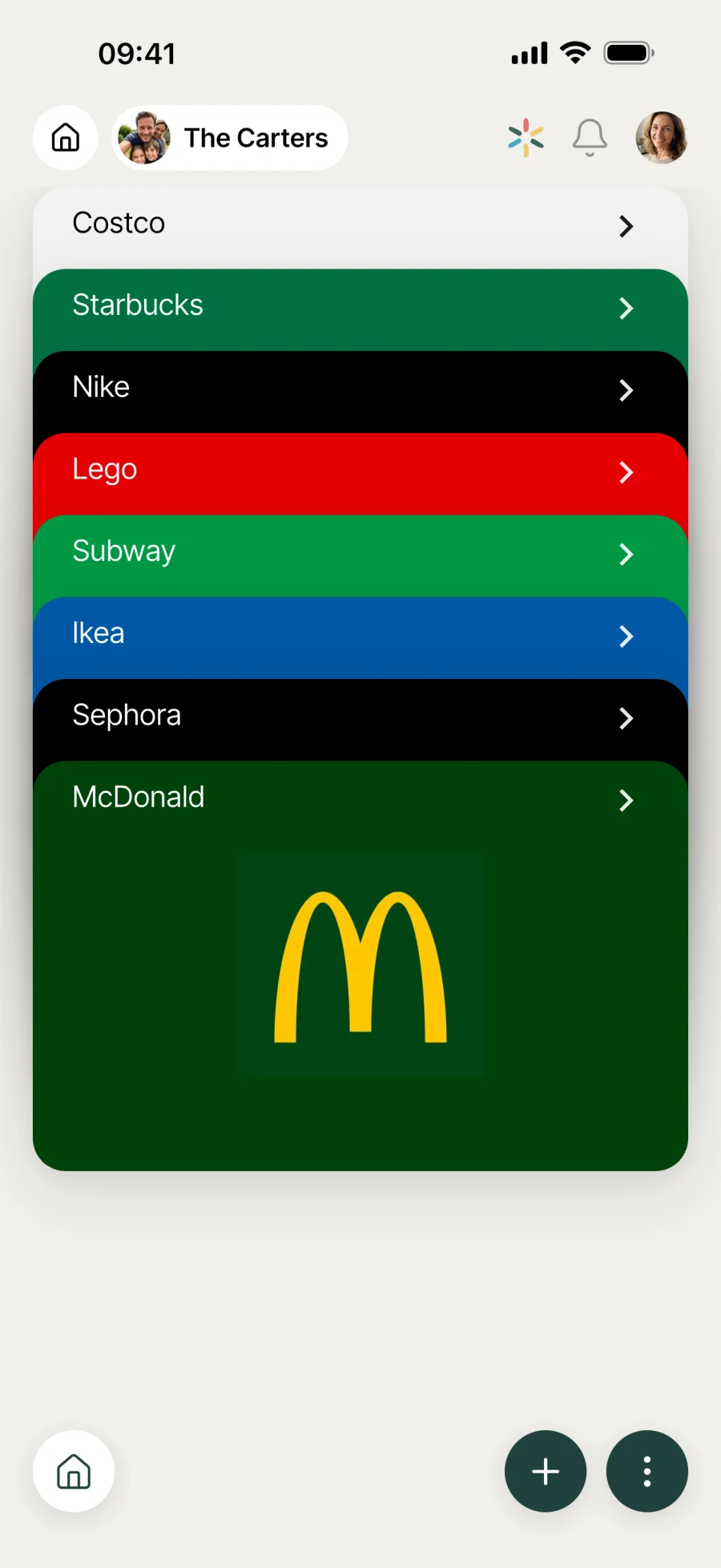
All your loyalty cards on your phone.
No more bulging wallet. All the household’s cards in one app, with a barcode or QR code to scan at the till, a built-in store catalogue and sharing with every member.
Everyday life
No more “I left it at home”
Loyalty cards pile up until your wallet is bursting. Having them all on your phone, shared with the household, changes how checkout goes.
At the till, the cashier asks for your card. You open Melimelo, 2 taps, and the barcode is ready to scan. No more bulging wallet, no more “oh sorry, I left it at home”.
Your partner is doing the supermarket shop. They have the household card in Melimelo, just like you. Points build up on the same account, whoever goes through the till.
You’re off to the shopping centre: Decathlon, the bookshop, Sephora. You open the app and scroll through your stacked cards. No more digging through an overstuffed card holder.
Features
Designed to lighten your card holder.
Shared with the whole household
All the household’s cards in one place, available to every member. A card added by one person can be used by the others in store, with no need to pass the physical card around.
Store catalogue
Search for the store in Melimelo’s built-in catalogue. The logo, colours and card format are filled in for you. All that’s left is to enter your card number.
Custom card
For your independent cinema, local hair salon or public library card: create a custom card with a name and a number, without waiting for it to be added to the catalogue.
Barcode or QR code to scan
At the till, the card fills the screen with its barcode or QR code ready to scan, and Melimelo turns the screen brightness up to full while you check out. Works with most shop scanners.
Reorder on the fly
Press and hold a card to move it within the stack. Put the ones you use most at the top so they’re just a tap away.
A lighter wallet
No more plastic cards piling up in your card holder. All your loyalty cards fit in your phone, already in your hand when the cashier asks.
Connected to the rest
Alongside everything else in the household.
- ShoppingShopping
When you shop, your Shopping list in one hand and your Loyalty card in the other: the whole trip round the shop happens in Melimelo, without switching apps.
- PlacesPlaces
Your favourite places on one side (the shops you go to), your loyalty cards on the other. 2 modules that complement each other around the household’s shopping habits.
- BudgetBudget
Loyalty schemes bring some costs down (groceries, leisure). The Budget module keeps an overview of spending, Loyalty holds the tools to bring the total down.
- TravelTravel
Cards for transport companies, hotel chains and travel programmes have their place in the wallet too, next to your everyday cards.


All the modules talk to each other. Not just these 4.
Free & Premium
What each plan includes for loyalty cards.
Try it out
€0no commitment
Included from the start, shared by the whole household.
- Card wallet shared by the whole household
- Store catalogue (guided 2-step flow)
- Custom cards for stores not in the catalogue
- Barcode or QR code shown for scanning at the till
- Drag-and-drop reordering
- Edit or delete a card
- Multi-user by design
Same as the free plan
Everything included free
€39.90/ year
that’s €3.32 a month
Nothing to unlock for this module.
All its features are already included in the free plan. See the free plan column for details.
A single Premium subscription covers the whole household, however many members it has. You take it out in the app on iPhone or Android, and it then works on every screen in the household.
06Questions about Loyalty
Everything people ask us about loyalty cards.
Straight answers to the questions people ask most before getting started.
07Get started
Your whole household,
on all your screens.
On iPhone, iPad, Android, Mac, Windows and in the browser. Every member connected, in real time. Your first module up and running in under a minute.
4.8out of 5
On the App Store
Active users
65k+
Already on board
No commitment, right in your browser.
3 steps, and the card is in your pocket.
Search or create
Look up the store in the Melimelo catalogue (the logo and format fill in automatically), or create a custom card with any name and number.
Enter your number
Type in the card number (or scan the barcode on the physical card to go faster). The code format (barcode or QR) is detected automatically.
Show the card at the till
When it’s time to pay, open Melimelo and open the right card. The barcode or QR code fills the screen, ready for the cashier to scan.