

Tasks
MelimeloTasks
Free up to a cap, unlimited with Premium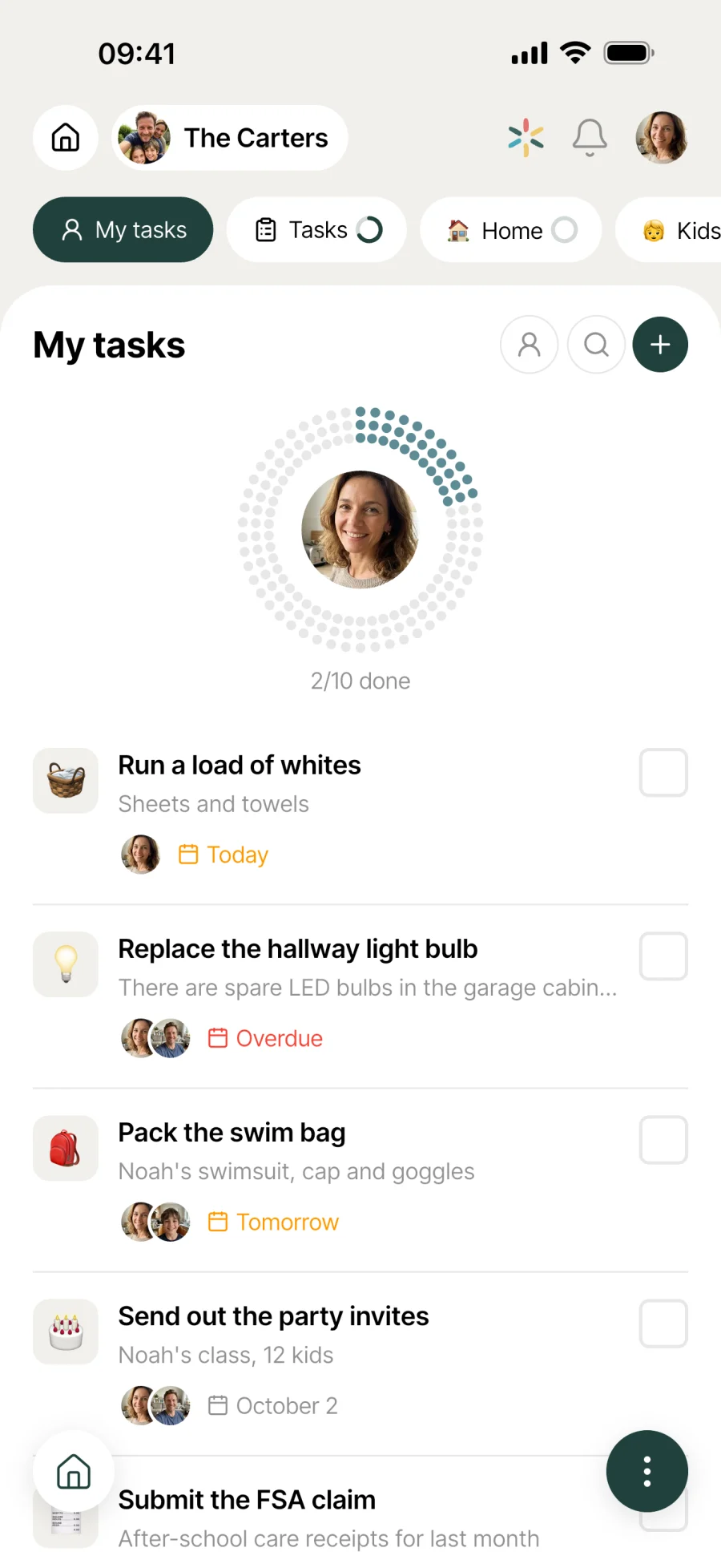
Household tasks, assigned and shared.
The household to-do list, shared by every member. Due dates, assigning to a person, reordering on the fly, sorting by date or by assignee. So nothing that needs doing gets forgotten.
Everyday life
No more “I thought you were doing it”
In a household, it’s not the big decisions that get forgotten, it’s the 20 little things each week. A list everyone keeps up together is what changes the game.
Mark sees “Call the plumber” assigned to him. He calls on his lunch break, ticks it off, and it shows as done for whoever added the task.
The list grows as the week goes on. Every household member adds whatever comes to mind. Reorder it by hand, by due date or by assignee, and today’s priority is clear.
Hands full as you leave the car park, you dictate “buy more milk tomorrow”. A task appears on the list, already dated. Quicker than juggling with the keyboard.
Features
Designed to let nothing slip through the cracks.
Shared by the whole household
Every member sees the list, adds, ticks off and edits in real time. No more “I forgot to tell you”, no more scraps of paper lost on the kitchen table.
Colour-coded due date
A task with a date changes colour as its due date gets closer. One glance shows what needs doing today.
Assigned to someone
An avatar on the right of each task, picked from the list of household members. Everyone knows what’s theirs without having to ask.
Manual reordering
Hold the handle on the left of a task and drag it where you want. The new order is shared with the whole household instantly.
Auto-sort by date or person
From the menu, run an automatic sort by due date or by assignee. The list rearranges itself to put what needs moving forward first.
Voice dictation
You talk, Melimelo types. Handy in the car, in the kitchen or with your hands full. A complete task without touching the keyboard.
Categories and kanban view
Cleaning, Garden, DIY, Paperwork... Each category becomes a tab, and the kanban view shows the columns side by side.
Automatic reminders
A task with a due date creates its own reminder, one per participant. If the date moves or you reassign the task, the reminders adjust without you lifting a finger.
Set the reminder before saving
You pick the reminder time right in the task form, before you even save it. No back and forth to another screen to adjust it afterwards.

Connected to the rest
Alongside everything else in the household.
- CalendarCalendar
Tasks handle one-off to-dos, the calendar handles one-offs at a set time. Side by side, both modules frame the household’s day-to-day.
- RoutinesRoutines
Whatever comes round every week or month lives in Routines. One-offs that change every time stay in Tasks.
- NotesNotes
An idea jotted down in Notes can become an actionable task in Tasks when the time comes to deal with it.
- BirthdaysBirthdays
Buying the present, ordering the cake, organising the party: these are tasks. The birthdays themselves live in Birthdays.




All the modules talk to each other. Not just these 4.
Free & Premium
What each plan includes for tasks.
Try it out
€0no commitment
Included from the start, shared by the whole household.
- List shared by the whole household
- Colour-coded due dates
- Assign to a household member
- Drag-and-drop reordering
- Auto-sort by date or by assignee
- Long description and emoji for each task
- Search your tasks
- Number of tasks 5 max
- Voice dictation
- Custom categories and kanban view
- Custom reminders (date, time, recipient)
- View and edit tasks offline
Everything unlocked for this module
No limits
€39.90/ year
that’s €3.32 a month
- List shared by the whole household
- Colour-coded due dates
- Assign to a household member
- Drag-and-drop reordering
- Auto-sort by date or by assignee
- Long description and emoji for each task
- Search your tasks
- Number of tasks Unlimited
- Voice dictation
- Custom categories and kanban view
- Custom reminders (date, time, recipient)
- View and edit tasks offline
A single Premium subscription covers the whole household, however many members it has. You take it out in the app on iPhone or Android, and it then works on every screen in the household.
06Questions about tasks
Everything people ask us about tasks.
Straight answers to the questions people ask most before getting started.
07Get started
Your whole household,
on all your screens.
On iPhone, iPad, Android, Mac, Windows and in the browser. Every member connected, in real time. Your first module up and running in under a minute.
4.8out of 5
On the App Store
Active users
65k+
Already on board
No commitment, right in your browser.
3 steps, and the list keeps itself in order.
Write down what needs doing
Tap plus and write the task. Add a description if needed, an emoji, a due date, or assign it to a household member.
Sort and prioritise
Drag to reorder by hand, or let Melimelo sort by due date or by assignee. With Premium, group by category.
Tick, done, move on
A finished task is ticked off in one tap. A little animation confirms it, and the update is shared with the whole household in real time.