

Birthdays
MelimeloBirthdays
Free and unlimited, with Premium options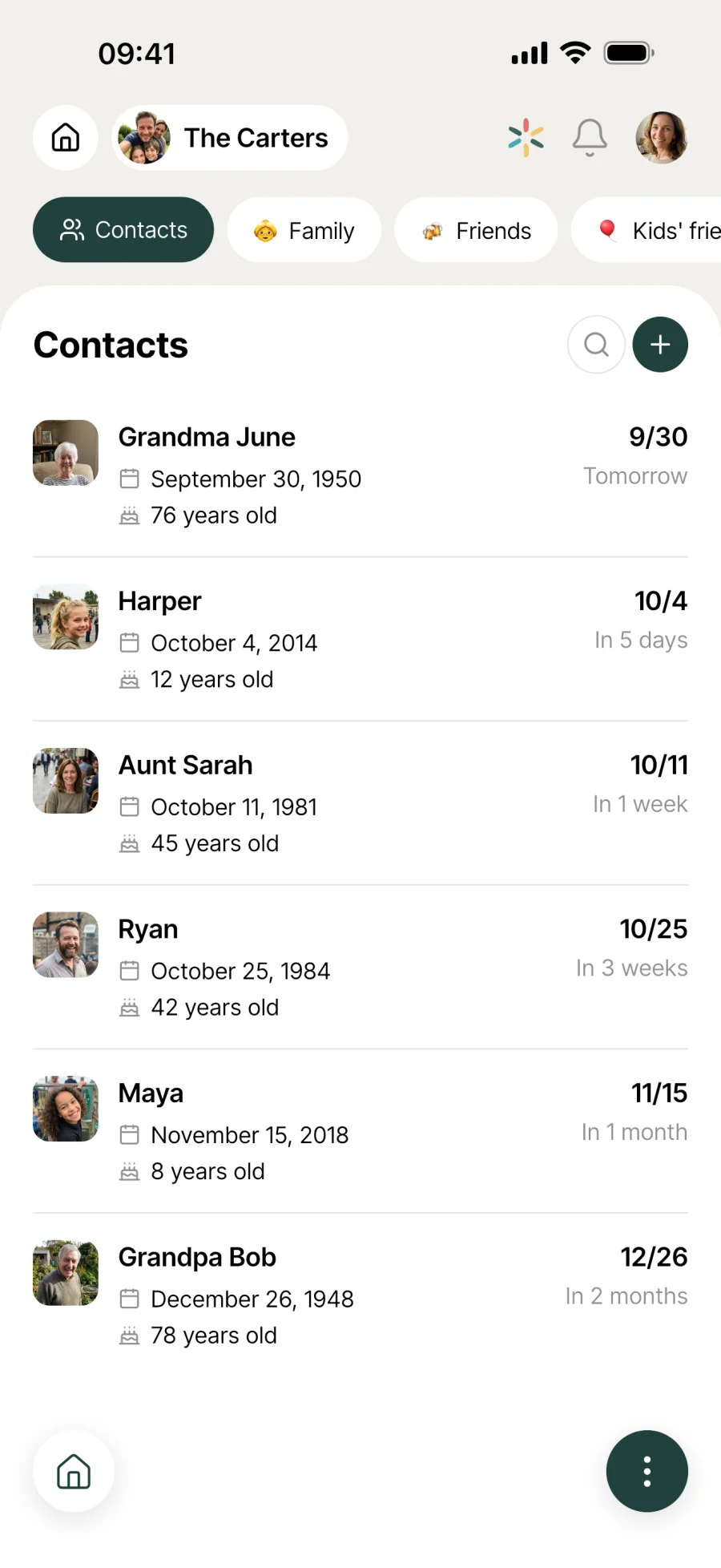
Every birthday that matters to your household.
Birthdays of family, friends, the kids’ friends, colleagues. All in one place, shared with the household, with photos, colour-coded dates and import from your contacts.

Everyday life
No more “when’s their birthday again?”
Your mother-in-law, Theo’s friend, the colleague who’s about to retire. The dates pile up and end up forgotten. A shared household list changes everything.
You open the app on a Sunday morning. One card is orange: Aunt Nicole, in 5 days. You plan the phone call, or open the gift list that goes with her. Nobody gets caught out.
On the morning of 12 March, you open the app. A burst of confetti on the screen reminds you it’s Tom’s birthday. No stressful notification, just a touch of good cheer to start the day.
Lucas, Theo’s friend, is coming round for tea on Saturday. You import his birthday from your phone contacts, photo included. 30 seconds later, his card is already on the list.
Features
Designed to never get caught out again.
Shared household list
All the important dates in one place, visible to every household member. Anyone can add, edit or add a photo. The same list in everyone’s pocket.
Colour-coded dates
Red if it’s today, orange within the week, yellow within the month, green further out. One look at the list and you know what’s urgent, without counting the days.
List or calendar
List view to browse the year’s birthdays in order, calendar view to see them on the month grid. Plus a widget on the app’s home screen showing the next 7 days.
Import from your phone
Instead of typing everything again, import contacts straight from your address book. The name and date come across, and the photo too if there is one.
Optional birth year
Only know the day and month? You can leave the year blank. The birthday stays on the list, just without the age.
Confetti animation
When you open the app on someone’s birthday, a burst of confetti goes off. A gentle way to remind you it’s today, and to add a bit of cheer.
Custom tags
Family, friends, colleagues, neighbours, the kids’ school, the sports club. Create your own tags with an emoji and a name, and assign them to as many contacts as you like.
Filter by tag
Each tag becomes a tab that filters the list instantly. Show just the family to plan a get-together, or just colleagues for Friday drinks.

Connected to the rest
Alongside everything else in the household.
- GiftsGifts
Contacts in the Birthdays module are shared with Gifts. One profile per person: a birthday on one side, gift ideas on the other.
- CalendarCalendar
The household calendar shows events at a set time (appointments, activities, holidays). The birthday list, in date order, lives right here in its own view.
- CirclesCircles
For birthdays shared beyond the household (extended family, groups of friends), Circles can bring the people involved together around an occasion.
- SplitSplit
For group gifts (a shared kitty, a joint birthday present), a shared Split works out who owes what to whom.



All the modules talk to each other. Not just these 4.
Free & Premium
What each plan includes for birthdays.
Try it out
€0no commitment
Included from the start, shared by the whole household.
- List shared with the whole household
- List view and calendar view
- Colour-coded dates (red, orange, yellow, green)
- Optional date of birth (no age shown if the year is missing)
- A photo for each person
- Import from your phone contacts (with photo)
- Confetti animation on the big day
- Multi-user by design
- Custom tags (Family, Friends, Colleagues, Neighbours...)
- Filter by tag (one tab per group)
Everything unlocked for this module
No limits
€39.90/ year
that’s €3.32 a month
- List shared with the whole household
- List view and calendar view
- Colour-coded dates (red, orange, yellow, green)
- Optional date of birth (no age shown if the year is missing)
- A photo for each person
- Import from your phone contacts (with photo)
- Confetti animation on the big day
- Multi-user by design
- Custom tags (Family, Friends, Colleagues, Neighbours...)
- Filter by tag (one tab per group)
A single Premium subscription covers the whole household, however many members it has. You take it out in the app on iPhone or Android, and it then works on every screen in the household.
06Questions about birthdays
Everything people ask us about birthdays.
Straight answers to the questions people ask most before getting started.
07Get started
Your whole household,
on all your screens.
On iPhone, iPad, Android, Mac, Windows and in the browser. Every member connected, in real time. Your first module up and running in under a minute.
4.8out of 5
On the App Store
Active users
65k+
Already on board
No commitment, right in your browser.
3 steps, and no one gets forgotten.
Type it in or import
Create one by hand with a name and a date, or import straight from your phone contacts. The contact’s photo comes along too, if there is one.
View it your way
List view for the year in order, calendar view for the monthly grid. The date colour code does the rest, so you can spot what’s coming up.
Plan ahead
When a birthday is coming up, open the gift list for that contact (contacts are shared with the Gifts module), or start planning the phone call.