

Circles
MelimeloCircles
Included in the free plan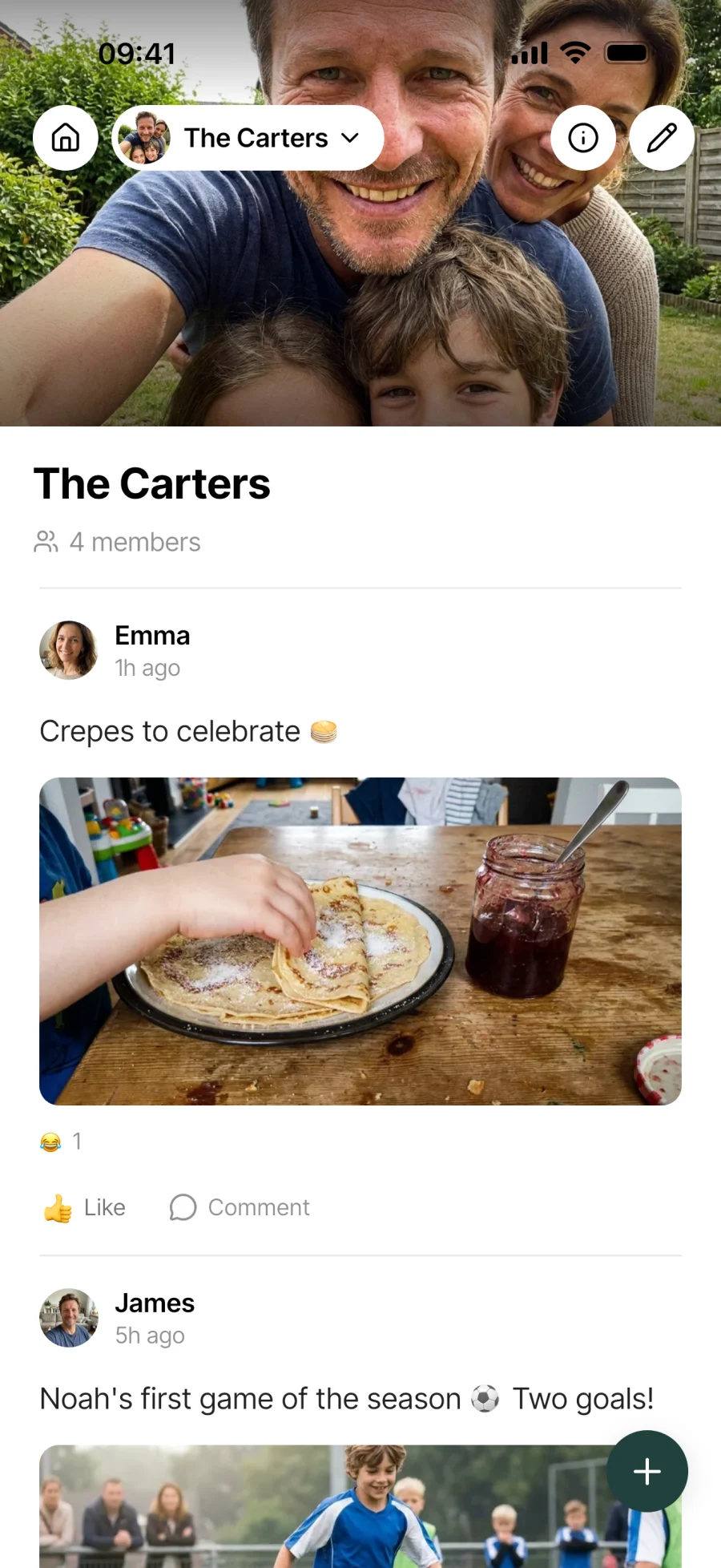
Private spaces for the people you choose.
Extended family, football mates, cousins, neighbours. Several private circles to share photos and moments with invited members only. No algorithm, no public social network.

Everyday life
No more posting the same thing in 10 places
Groups of loved ones deserve their own space, without a public social network or an algorithm. A private circle brings the conversation back to the people who really matter.
When your nephew is born, you create the “Extended family” circle. Only invited members see the photos shared. No public social network, no algorithm: a private space for the people you choose.
You post a photo from the day at the park. Your sister reacts with a heart, your uncle with a laughing emoji. No more sharing in 10 different places (WhatsApp, texts, Instagram): it all stays in one place, inside the circle.
Press and hold the Like button to bring up the reactions bar. Pick the emoji that fits the moment: surprise, joy, a soft spot. A nuance that’s often missing from ordinary messaging groups.
Features
Designed to keep it between you.
100% private space
Only a circle’s members see what’s posted in it. No algorithm deciding who sees what, no making money from your data: a private space for the people you choose, full stop.
Several circles
Extended family, football mates, neighbours, cousins. Create as many circles as you have groups in your life. Each one has its own tab so you can keep up with what’s shared.
Text and photo posts
Post a short message, a photo, or both. The photo icon in the compose bar opens your gallery or camera to add an image to the post.
Custom reactions
Press and hold the Like button to bring up the reactions bar and pick an emoji. More than simple likes: the nuance matches the moment.
Light-touch moderation
A post’s author can delete it at any time, and so can a circle admin. No automatic moderation, nothing opaque: the rules are simple and run by the members themselves.
Create or join
The plus button next to the circle tabs: create a new circle that you’ll run as admin, or join an existing circle if someone has shared an invitation link with you.
Connected to the rest
Alongside everything else in the household.
- BirthdaysBirthdays
The Extended family circle brings together the people whose dates you keep in Birthdays. Sharing moments in Circles adds to the list of dates that matter.
- SplitSplit
A group gift or a weekend planned in a circle often has a split running alongside: the circle holds the photos, the moments and the chat, the split holds the same group’s accounts.
- TravelTravel
For a group trip, a dedicated circle can hold the shared photos and memories, while the logistics live in the Travel module.
- MessagesMessages
Circles for chosen groups who share moments over time. Messages for the household’s direct conversations. 2 modules for 2 different uses.


All the modules talk to each other. Not just these 4.
Free & Premium
What each plan includes for circles.
Try it out
€0no commitment
Included from the start, shared by the whole household.
- Private circles (visible to members only)
- Create a circle or join an existing one
- Text and photo posts
- Emoji reactions of your choice
- Post deletion (by the author or a circle admin)
- A dedicated tab for each circle
- Several circles for different groups (family, friends, neighbours)
Same as the free plan
Everything included free
€39.90/ year
that’s €3.32 a month
Nothing to unlock for this module.
All its features are already included in the free plan. See the free plan column for details.
A single Premium subscription covers the whole household, however many members it has. You take it out in the app on iPhone or Android, and it then works on every screen in the household.
06Questions about Circles
Everything people ask us about circles.
Straight answers to the questions people ask most before getting started.
07Get started
Your whole household,
on all your screens.
On iPhone, iPad, Android, Mac, Windows and in the browser. Every member connected, in real time. Your first module up and running in under a minute.
4.8out of 5
On the App Store
Active users
65k+
Already on board
No commitment, right in your browser.
3 steps, and the circle comes alive.
Create or join a circle
The plus button next to the tabs: create a new circle (with a name and a theme) that you’ll run as admin, or join an existing circle if you’ve received an invitation.
Post
Text, photo, or both. The post appears in the circle’s feed, visible to members only. No algorithm between you and the people you care about.
React
The Like button for a simple like, press and hold to choose an emoji from the reactions palette. A post’s author can delete it, and so can the circle admin.